

Portable Digital Video Recorder with Remote for Fish Scout Camera Systems
Features:
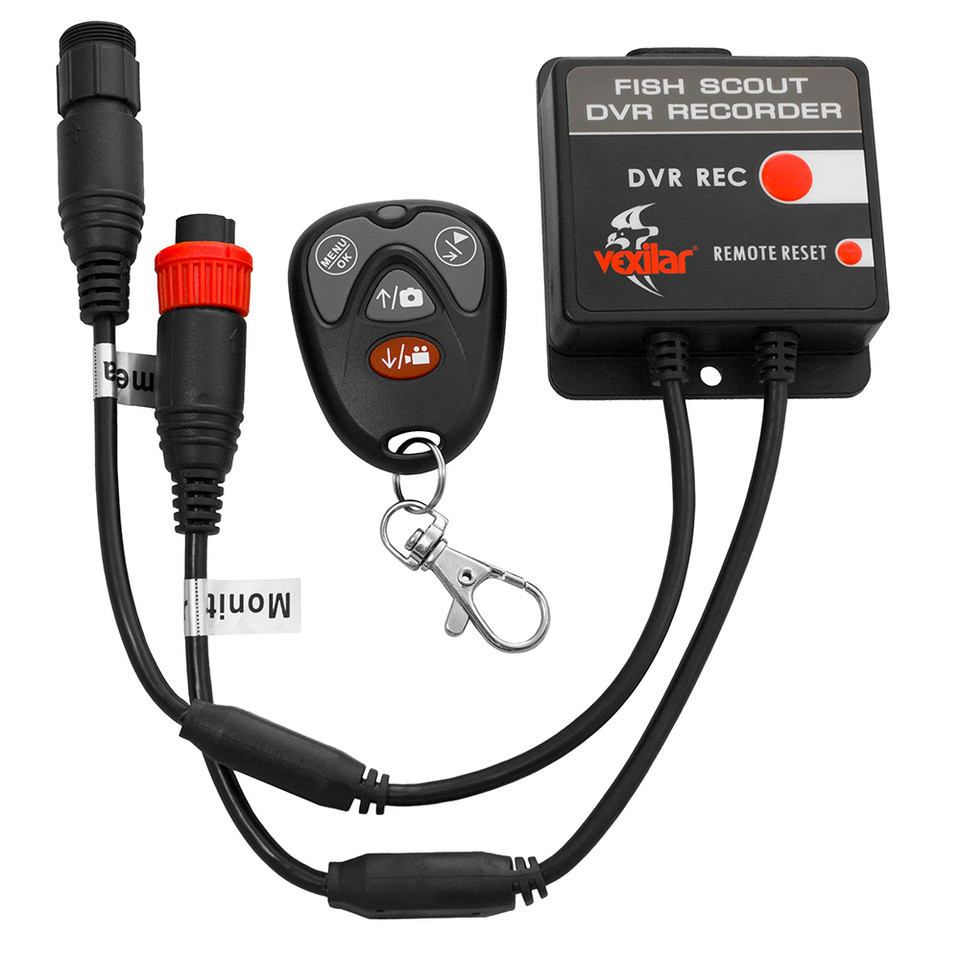
- Playback/Right: Press to playbackvideos/photos or move right when selecting menu items
- LED indicator: Lights up when any button of key fob is pressed
- Menu/OK: Press to bring up the menu or select menu items
- Photo/Up: Press to take a photo or move up when selecting menu items
- Rec/Down: Press to start/stop video recording or move down when selecting menu items
Micro SD card slot: Up to 32 GB (not included) - Record: Press to start recording. Press again to stop recording
- Remote reset: To pair a new key fob with the DVR, press the reset button and then keep pressing any button on the new key fob for about five seconds
- Connect to camera or DTD controller box
- Connect to monitor
- Max recording time: 2GB: 4h 4GB: 8h 8GB: 15.5h 16GB: 32h
Set Date and Time:
Power on the DVR.
Press the Menu button onthe key fob.
Press the Right button untilreaching Set Date Time.
Press the OK button tobegin.
Use the Up/Down buttonsto set the correct date andtime.
Press the OK button againto finish.
Recording Video:
When the DVR is in standbymode, press the Rec buttonon the key fob or the DVRunit to start recording video.Press the Rec button againto stop recording.
Taking a Photo:
When the DVR is instandby mode, press thePhoto button on the keyfob to take a photo.
Playback of Videos/Photos:
When the DVR is in standby mode, press the Playback button on the key fob. The latest video or photo will be displayed.Follow the on-screen instruction to view more recordings.
 WARNING: This product can expose you to chemicals which are known to the State of California to cause cancer, birth defects or other reproductive harm. For more information go to P65Warnings.ca.gov.